











 569
569
CAD/CPQ system for online kitchen design, 3D visualization, and automatic cost calculation
Today's clients want to receive their kitchen design as quickly as possible to see visualizations, understand the cost, and make a decision without long waits. That's why we developed a CAD/CPQ system for kitchen design — an online program that combines design, visualization, and cost calculation in a single interface.
The system is suitable for:
- kitchen manufacturers;
- furniture stores;
- designers;
- surveyors;
- sales managers;
- companies that want to speed up the preparation of commercial proposals and automate calculations.
The basic version of the system has already been developed and can be adapted to the specifics of your production and your calculation logic.

Interactive kitchen design in 2D and 3D
On the left side of the screen, a 2D drawing of the kitchen is displayed, and on the right, a full 3D visualization of the project.
Any change to the plan is instantly displayed in 3D:
- moving cabinets;
- resizing;
- adding windows and doors;
- changing the kitchen configuration.
The designer and client immediately see the final result, which significantly speeds up project approval and reduces errors.
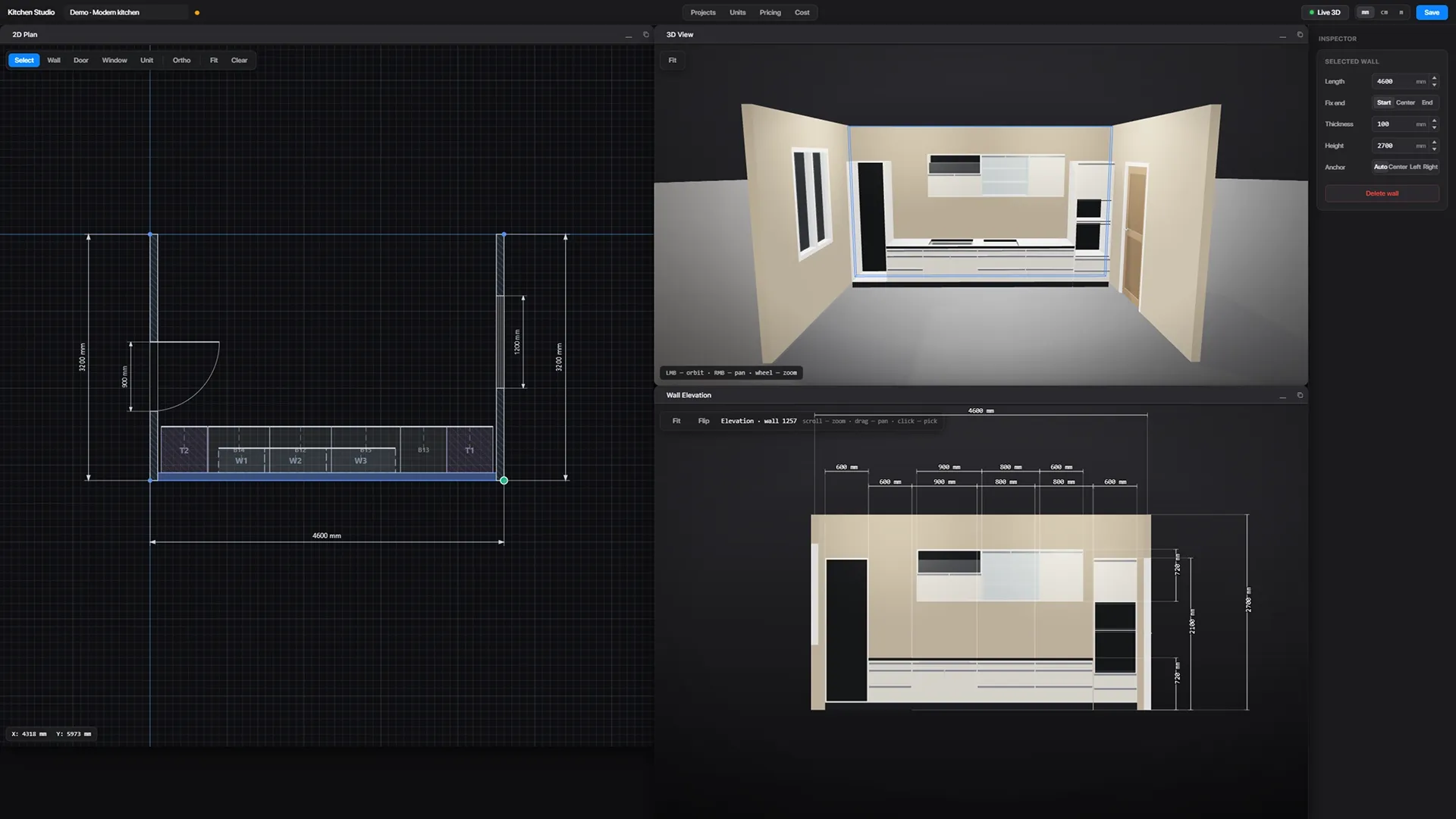
Parametric configurator of kitchen modules
The system uses a library of pre-prepared units: cabinets, tall units, facades, countertops, storage sections, and built-in appliances.
Each module can be saved in the database and reused in new projects. This makes kitchen assembly much faster.
For each unit you can configure:
- dimensions;
- materials;
- facades;
- fittings;
- internal structure;
- price.
When changing parameters, the following are automatically updated: 2D drawing, 3D visualization, specification, and cost calculation.

Automatic kitchen cost calculation (CPQ)
The system automatically calculates the project cost based on:
- materials;
- sizes;
- modules;
- fittings;
- additional options.
The manager immediately sees:
- cost of each item;
- calculation details;
- the final cost of the kitchen.
The price is updated in real time whenever the project changes, allowing you to quickly prepare commercial proposals and coordinate projects with the client.
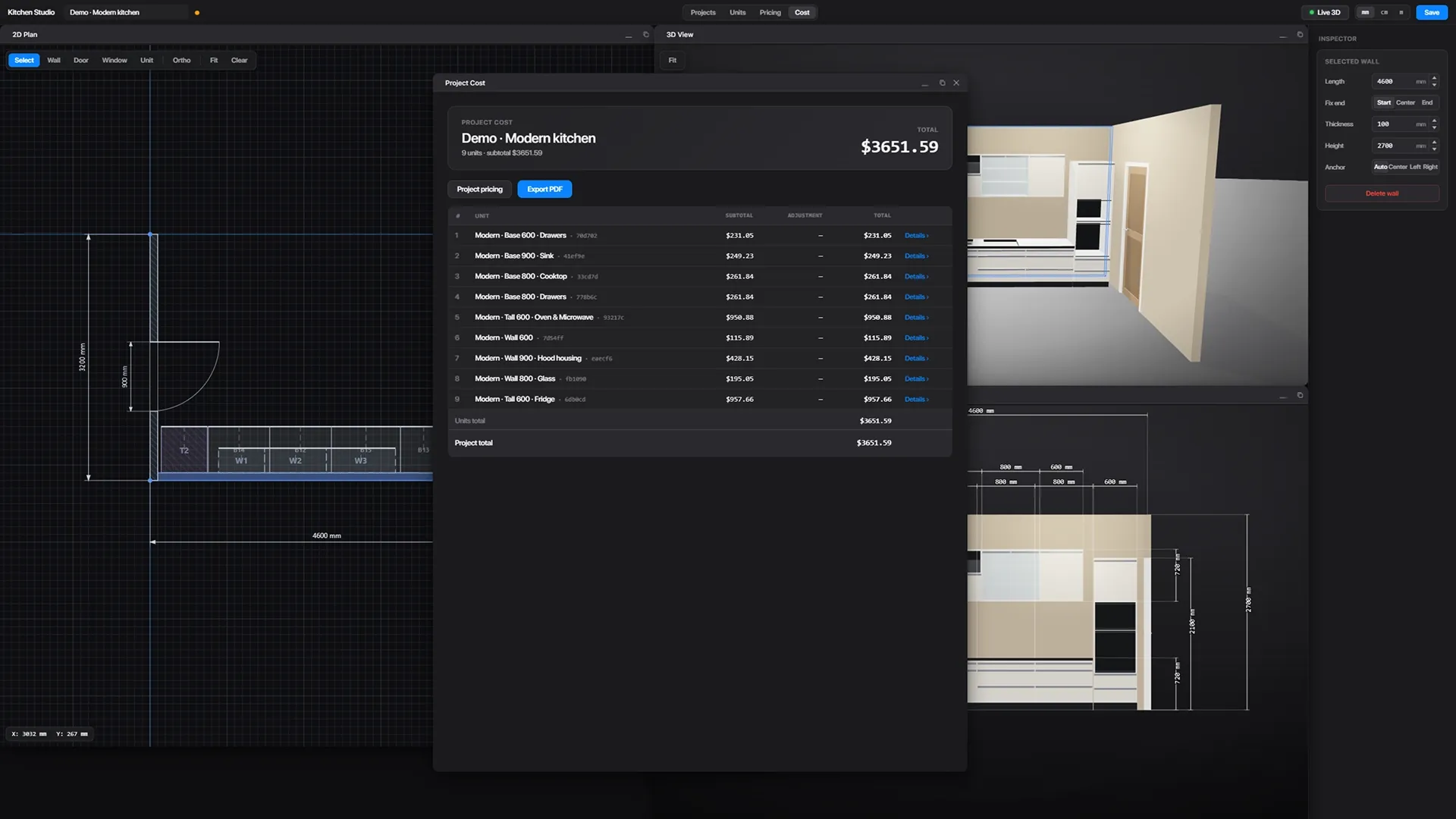
Generating a PDF commercial proposal
Once the design is complete, the system automatically generates a PDF document containing:
- 2D drawing;
- 3D visualization;
- dimensions;
- specification;
- cost of the project.
The document can be sent immediately to the client or transferred to production without additional preparation.


An online system that runs in a browser
The program works entirely online and does not require installation on a computer.
The system supports:
- Windows;
- macOS;
- Linux.
This allows managers, designers, and surveyors to work on projects from any office or remotely via a browser.
Possibility of adaptation to your production
The system can be customized to suit your needs:
- cost calculation logic;
- module structure;
- generation of documentation;
- integration;
- production processes;
- CRM and internal company systems.
You get not just a kitchen designer, but a full-fledged CAD/CPQ platform for automating sales and kitchen design.
What does your business get?
The implementation of a CAD/CPQ system allows:
- speed up the preparation of commercial proposals;
- reduce the number of errors;
- increase sales speed;
- standardize calculations;
- automate interactions between sales and production;
- improve the quality of the kitchen presentation to the client.
The system's main goal is to quickly show the client the future kitchen, its cost, and prepare the order for production.
Useful materials
- Development of CAD systems for manufacturing companies
- Development of CPQ systems
- Integration with CAM systems
- CAD/CPQ system for kitchen production
- Development of furniture designers
- 3D configurators + AI + CPQ increase conversion rates for custom product sales.
- Configurator vs. Designer: What's the Difference?
- CRM for the furniture business: a working combination of AvadaCRM + configurator + AI assistant


