









Interior Design Builders and Configurators
Interactive online interior design tools are one of the most effective ways to shorten the sales cycle and reduce the number of irrelevant inquiries.
AVADA MEDIA develops two types of such tools — interior builders and interior configurators in 2D, 3D and combined formats.

What is the difference between a builder and a configurator?
These are two different tools with different operating logics and it's important to understand which one solves a specific business problem.
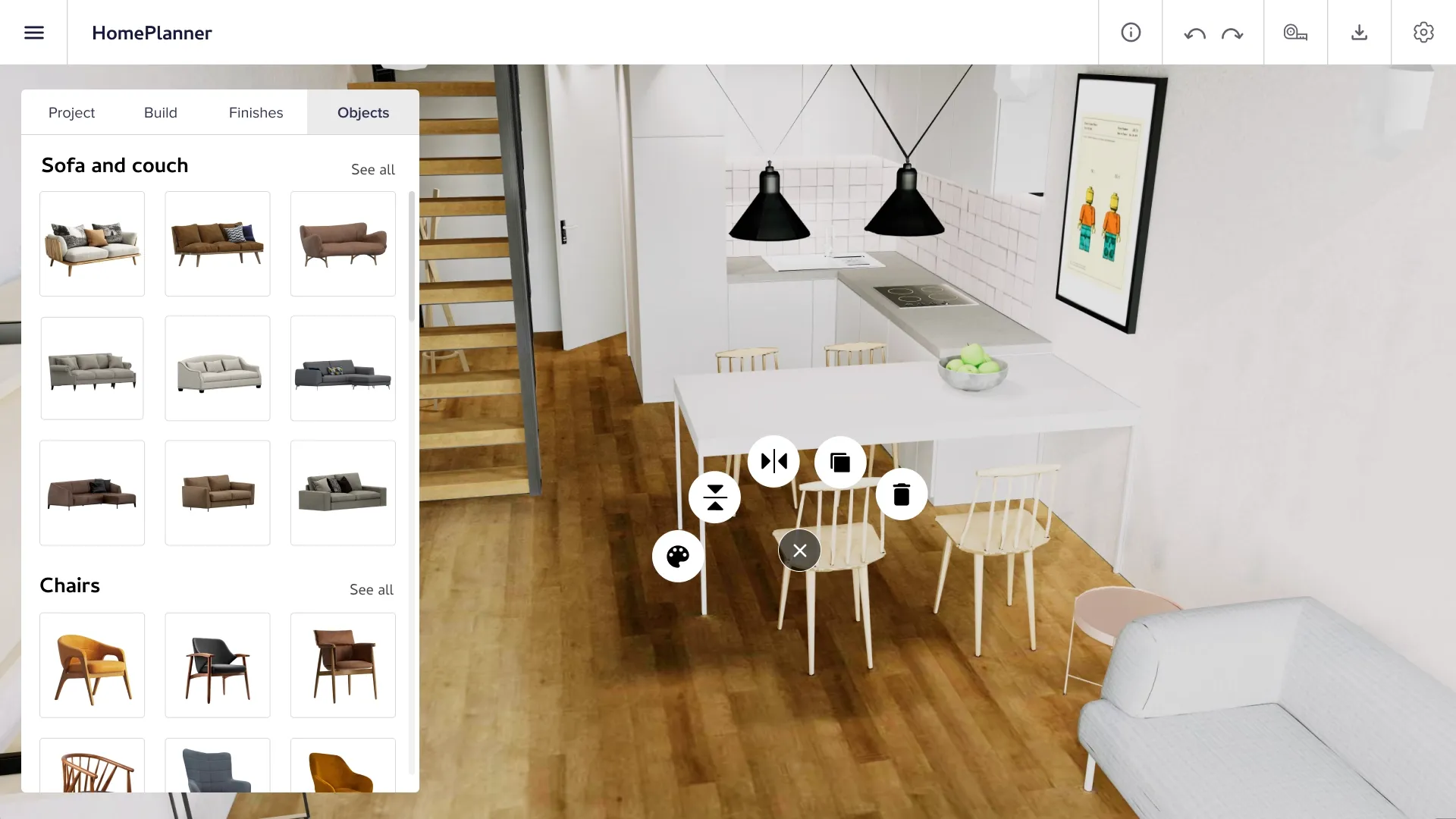
Interior builder is an interactive space planner. Users work with an empty or basic space: they can arrange furniture, change the layout, add partitions, and view the result from above in 2D or switch to 3D mode and evaluate the interior in volume. This is a tool for those creating a space from scratch.
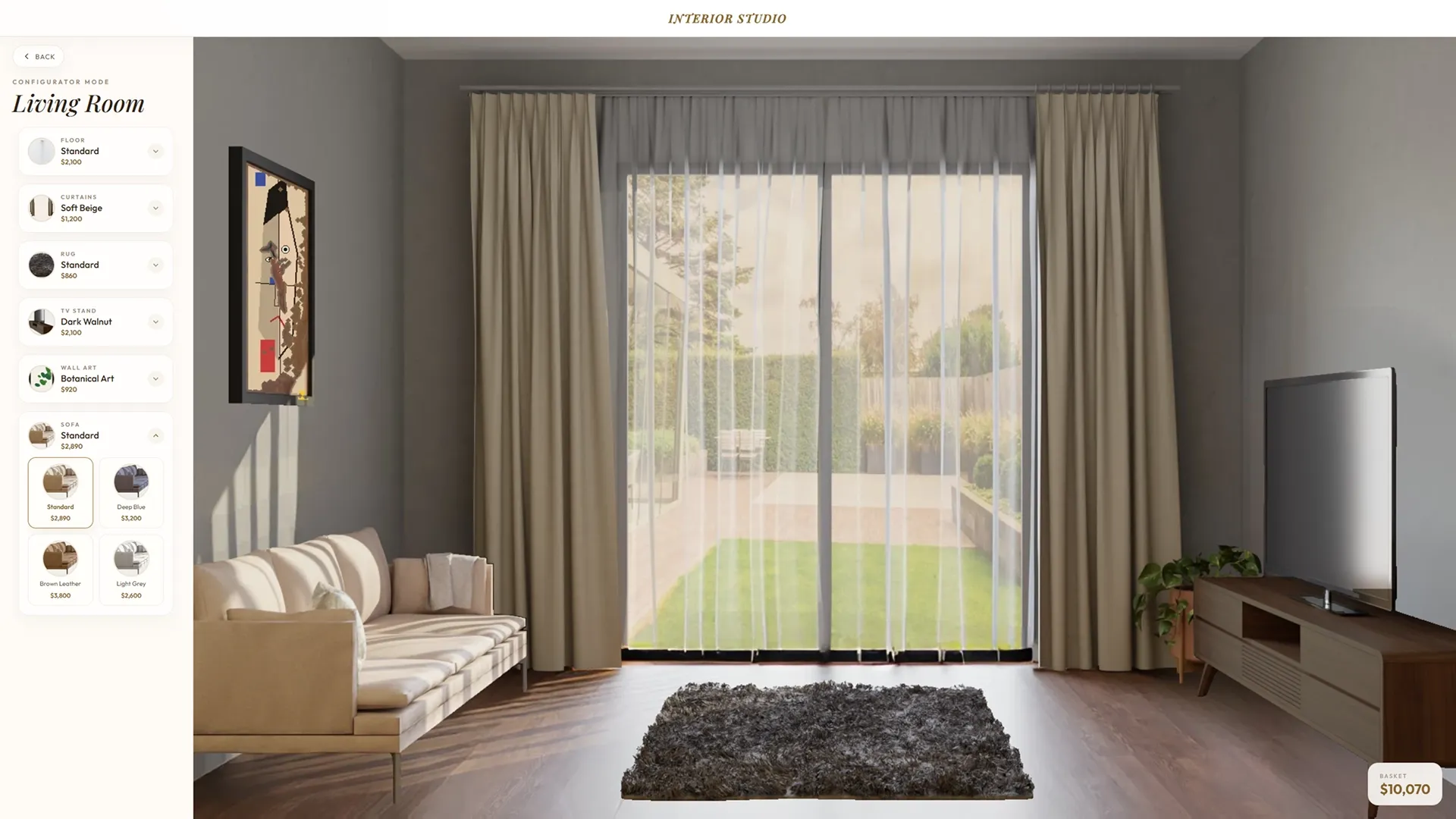
The interior configurator is a tool for working with existing designs. Users see a picture of a pre-furnished room and can change the color of the walls, floor, curtains, upholstery, and other elements without having to redesign the interior from scratch, but rather customize the existing one to suit their preferences.
If you're interested in learning more about the differences between these tools, we've prepared a separate article for you where we discuss this in detail.
Both tools can be implemented in 2D and 3D, complement each other within a single project and address the needs of different audience segments.
Who needs these tools?
An interior builder can help when a client needs to assemble a space from scratch:
- Interior builder are given a tool that speeds up one of the most time-consuming parts of the job presenting the concept to the client. Instead of preparing static renderings in third-party programs and redoing them every time the client wants to "try a different wall color" or "see how a sofa by the window would look," the designer can present everything right during the meeting in real time, with the ability to make adjustments on the spot. The client sees the result instantly, makes decisions faster, and is less likely to return with endless revisions.
- Furniture companies and retailers can offer customers the opportunity to arrange furniture from their catalog in their own room models, allowing them to immediately see how a particular sofa or shelving unit will fit into the space. This shifts the decision-making process from "I like it in the store" to "It's right for me."
- Builders and developers can provide apartment buyers with a tool for independent interior builder during the pre-sale stage, with real floor plans and the option to choose from available finish packages.
- Renovation and construction platforms can integrate the designer as an additional tool for users, allowing them to plan spaces directly within the service without relying on third-party solutions.
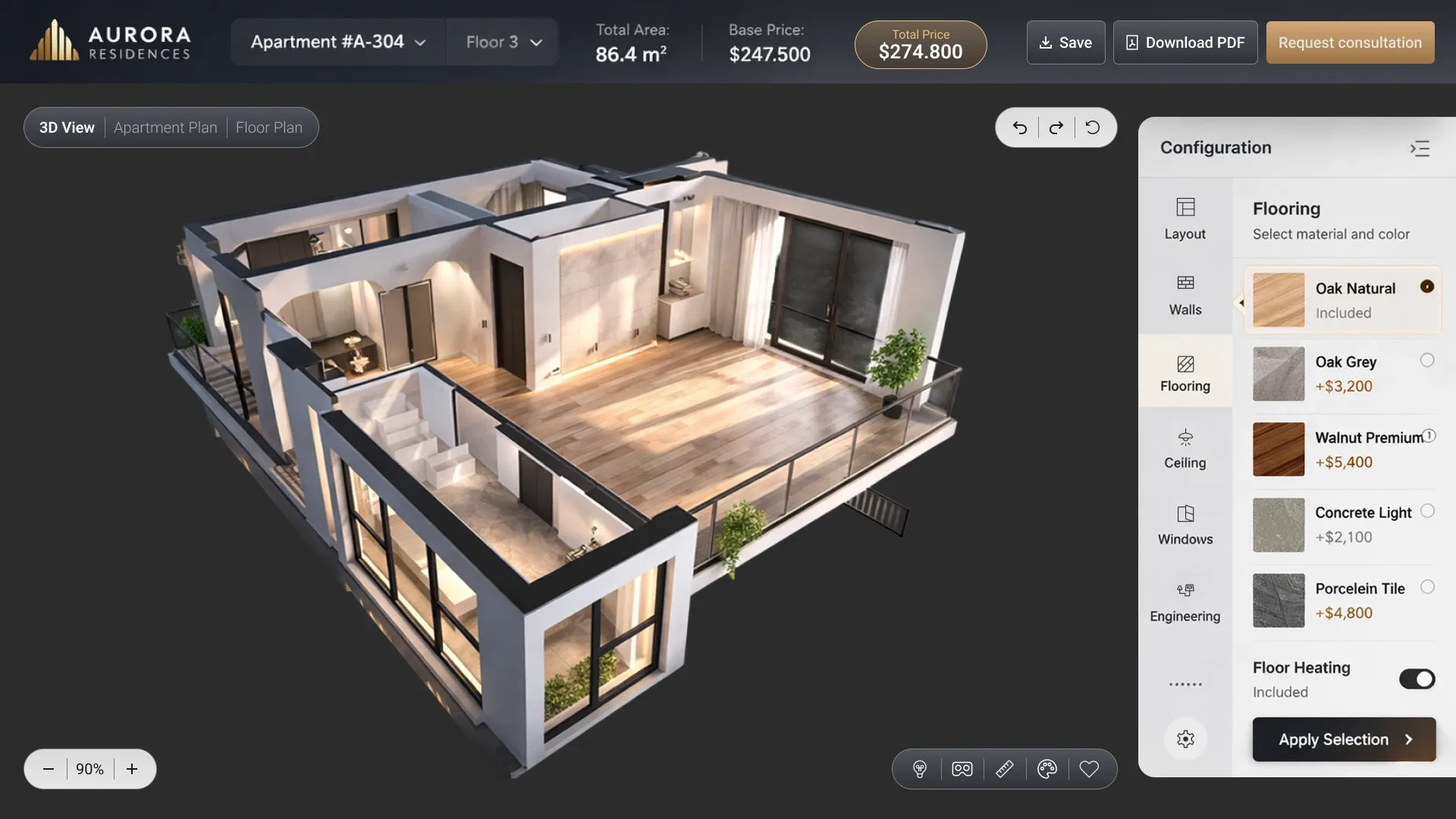
An interior configurator is ideal when there's a ready-made visual solution and you want to give the client the opportunity to customize it:
- Designers and architectural firms can use the configurator as a client approval tool: show several color scheme options for the finished interior, compare them side by side, and finalize the selection right at the meeting.
- Manufacturers and distributors of finishing materials can embed a configurator on their website so that customers can apply their product: tiles, paint, flooring to a finished interior rendering and evaluate the result before purchasing.
- Online stores and retailers can offer customers the opportunity to see their chosen product: lamps, textiles, decor in the context of a real interior.


Interior builder: how it works
An interior builder is an online planner that allows users to create their own space using available elements.
See how it works in 2D mode: the user works with a floor plan from above and can:
- set the dimensions of the room;
- arrange furniture and objects from the catalogue;
- change their position and orientation;
- add partitions.
This is a fast and intuitive mode for working with planning.
Here's the same interior in 3D: the user can switch from a plan to a full visualization, rotate the model and evaluate the space as it will look in reality.
The combined format combines both modes in a single interface: the user can plan in 2D, then switch to 3D and evaluate the result in a volumetric representation – without leaving the application.
What elements does an interior builder consist of?
Room model. The user can specify the room's parameters, including shape, dimensions, and window and door locations. The builder can also upload ready-made floor plans — for example, actual apartment plans from the developer.
Furniture and object catalog. Users can select items from the catalog: sofas, tables, chairs, cabinets, lamps, and decor. The catalog is based on the customer's actual inventory — the buyer sees exactly the products that are available for purchase.
Customize elements. Each object can be moved, rotated, and scaled. Some items may be customizable, including color, upholstery material, or configuration, depending on the project's needs.
Zoning. The user can divide the room into functional zones, add partitions, and visually delimit the space.
Area and quantity calculation. The builder can automatically calculate the occupied area and distances between objects, ensuring that the layout is not only beautiful but also realistic.
To see how this can be implemented in practice, check out our demo project: 2D/3D apartment builder Floor Craft.


Interior configurator: how it works
The interior configurator works with a ready-made visual solution. Users see a render of the furnished room and can customize individual elements — without reassembling the interior, simply by changing what's already there.
Let's show you using our demo example - Interior Configurator.
Choose a room: living room, bedroom, kitchen and you'll immediately find yourself in a ready-made interior that you can customize.
- Change the flooring: dark walnut, light wood, other options from the palette.
- Switch the color of the curtain.
- You choose a sofa, a carpet, a TV stand, a picture on the wall.
Each element is individually customizable, and all changes are applied instantly making it immediately clear how a single decision can transform the overall feel of the space.
What elements does the interior configurator consist of?
A ready-made render or 3D scene. The configurator is based on a prepared visual solution: a photorealistic render of a room or a 3D interior model. This could be a standard design project, a showroom interior, or the client's actual apartment.
Customizable elements. See what the user can change:
- color and texture of the walls;
- floor covering - material, color, installation pattern;
- ceiling color and material;
- upholstery and color of furniture;
- color and type of curtains and textiles;
- decorative elements - lamps, carpets, pillows.
Color palettes and collections. The palette is based on the customer's actual catalog: paints, finishing materials, fabrics. The user chooses from a current assortment, not from abstract colors.
Presets and ready-made styles. The configurator lets you add ready-made color schemes: Scandinavian, minimalist, classic that you can apply with one click and then customize.


Functionality of the builder and configurator
These tools may include the following features:
- Instantly apply changes. Any change in color, material, or element can be reflected in real time without reloading or waiting for rendering.
- Comparison of options. The user can save multiple configurations and compare them side by side a convenient tool for making a final choice between two solutions.
- Export results. The user can obtain a PDF document with a visualization of the interior and a list of selected items a ready-to-use file for sharing with a designer, contractor, or sales department.
- Automatic cost calculation. When selecting materials and furniture, the system can automatically generate an estimated estimate based on current catalog prices.
- Uploading a real floor plan. The builder can accommodate uploading your own floor plan the user doesn't have to recreate the layout from scratch; they can immediately work with the actual parameters of their space.
- Mobile-friendly. Both tools are compatible with smartphones and tablets.
Additional features
Integration with CRM allows you to transfer data about the selected configuration or layout to the sales department the manager can see exactly what the client has chosen even before the first contact.
Synchronization with the catalog and price list allows you to keep your product range up-to-date: new furniture or material collections can automatically appear in the designer and configurator.
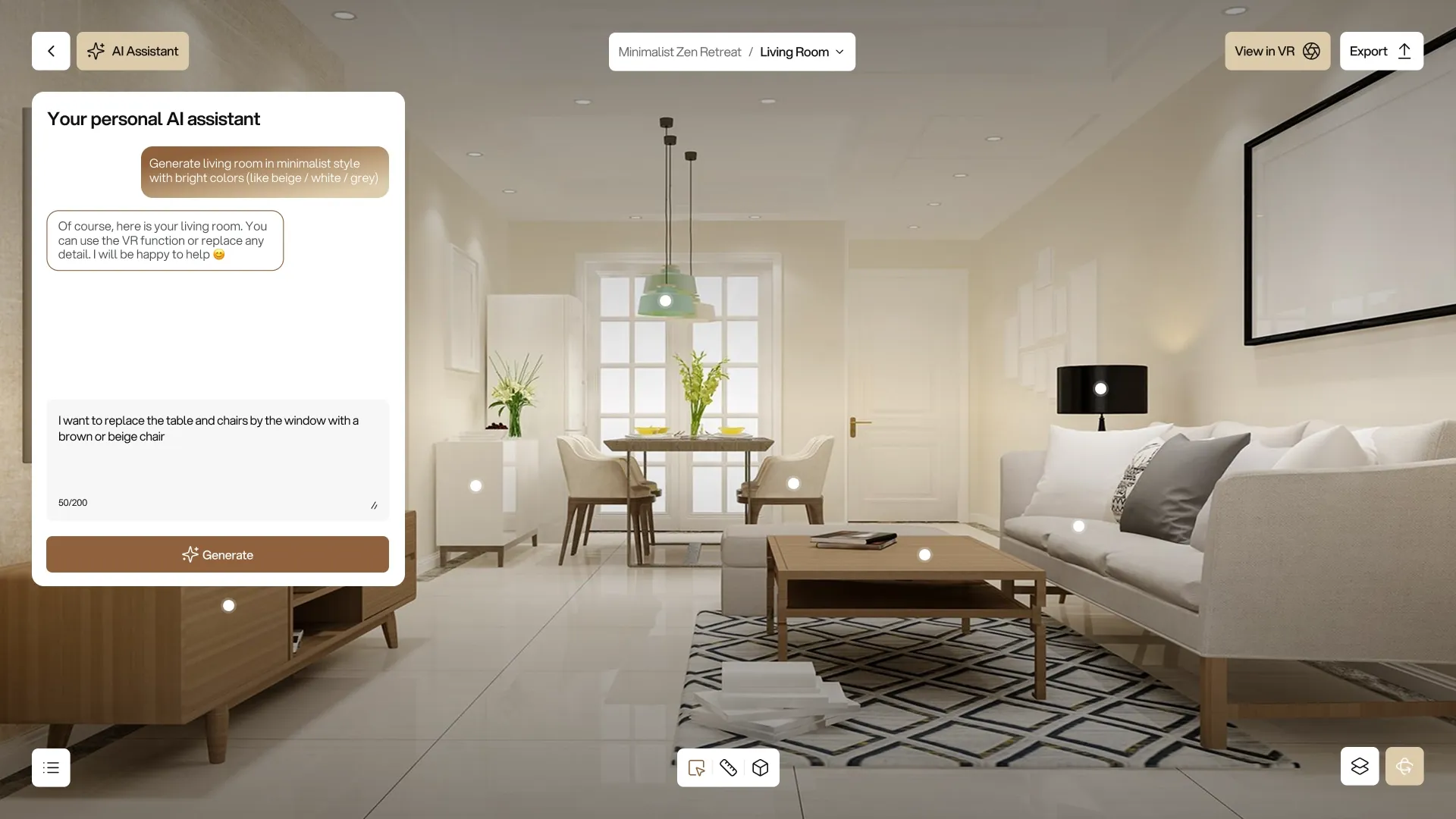
Connecting an AI assistant allows the user to receive personalized recommendations on layout and color schemes, taking into account the room's size, style, and budget. The AI can suggest ready-made furniture arrangements or color combinations, which the user can then customize.
AR mode allows users to point their smartphone camera at a real room and see their chosen furniture or finishes right there in their space without rendering or manually uploading photos.
Analytics and statistics allow us to track which layouts, styles, and color schemes users choose most often a valuable source of data for product selection and marketing.
Cost and development time
The final cost depends on the tool format, visualization depth, catalog size, and required integrations.
| Tool type | Development period | Price |
|---|---|---|
| 2D interior builder | 4–6 weeks | from $5,5k |
| 2D/3D interior builder | 8–12 weeks | from $7k |
| 2D interior configurator | 3-5 weeks | from $5,5k |
| 3D interior configurator | 10–16 weeks | from $7k |
| Combined solution (builder + configurator, 2D/3D, full functionality) | 14–20 weeks | from $18k |
| Custom development for the customer's needs | by agreement | upon request |
Prices and deadlines are approximate: the final project parameters are determined after analyzing the customer's technical specifications and catalog.
Technical implementation
The interior builder and configurator are developed as web applications and can run in a browser without installing additional software.
For 3D formats, the Three.js library forms the basis for visualization. It provides rendering of volumetric scenes, realistic material display and accurate lighting. Models are prepared in GLTF/GLB or Spine formats.
For 2D formats, the Canvas API or SVG rendering is used. Applying changes, calculating costs, and processing user actions can be done client-side, eliminating latency and unnecessary server roundtrips.
Development stages
- Analytics and design. The tool type or combination, catalog structure, interaction logic, and use cases are determined. UX/UI designers develop the interface with mobile devices in mind.
- Model preparation is the most labor-intensive stage. 3D models of furniture, rooms, and material textures can be developed by the team from scratch, provided by the client, or purchased from stock sites and refined. Texture maps are created for each material: color maps, roughness maps, and normal maps — which are responsible for the visual authenticity of the interior.
For the 2D configurator, a set of renders is prepared for each combination of configurable elements. The larger the catalog and the more customization options, the greater the volume of graphics that must be prepared and linked to the interface logic.
- Frontend and backend development. These are conducted in parallel. Frontend developers integrate models into the interface and configure interactivity. Backend developers build server-side logic: storing configurations and plans, processing requests, and connecting with the catalog and external systems.
- Administrative panel development. The client receives a tool for independently managing the furniture and materials catalog, setting presets, and updating prices without contacting the developers.
- Integration. If necessary, we can connect the customer's CRM, price list, or other systems.
- Testing and optimization. Tools are tested on different devices and browsers, optimizing loading speed and interface responsiveness when working with a large catalog.
Why AVADA MEDIA
Configurators and builders are one of our key areas of expertise. Over the years, we've developed a clear approach: we use only UX and technical solutions that truly deliver results and are easily scalable. Our projects are handled by a well-coordinated team of UX/UI designers, 3D artists and developers with extensive experience in creating similar systems.
Tell us about your project
Contact us and describe your task – we will suggest a suitable format, estimate the scope of work, and prepare a commercial proposal.


FAQ
-
Is it possible to combine a builder and a configurator in one product?
Yes. Both tools can be implemented as a single solution: the user first creates a floor plan in the builder and then configures colors and materials in the configurator mode all within a single interface.
-
What do I need to provide to start development?
For the builderr, we offer a catalog of furniture and objects with dimensions and part numbers, as well as room layouts. For the configurator, we offer ready-made renderings or 3D interior models and a catalog of materials with color options. If we don't have any materials, we'll sort them out during the analysis stage.
-
Is it possible to add new items to the catalog after launch?
Yes. The admin panel allows customers to independently expand their furniture and materials catalog, add new style presets and update prices without contacting the developers.
-
Do the tools support smartphones?
Yes, mobile adaptation is part of the core development. The interface is optimized for touchscreens, giving users the same functionality on a smartphone as on a desktop.
-
Do you provide support after launch?
Both tools are being developed as stable, ready-to-use solutions and require no ongoing maintenance once launched. Support as a separate service is available should the catalog need to be significantly expanded in the future, new room types added, or additional integrations enabled.