











 603
603
Today's door market is becoming increasingly competitive. Customers don't just want to browse a catalog or download a PDF file they want to assemble a door themselves, see the result before ordering, and immediately understand how it will look in a real-life space. This is why online door configurators are becoming a powerful sales tool for manufacturers, dealers, and showrooms.
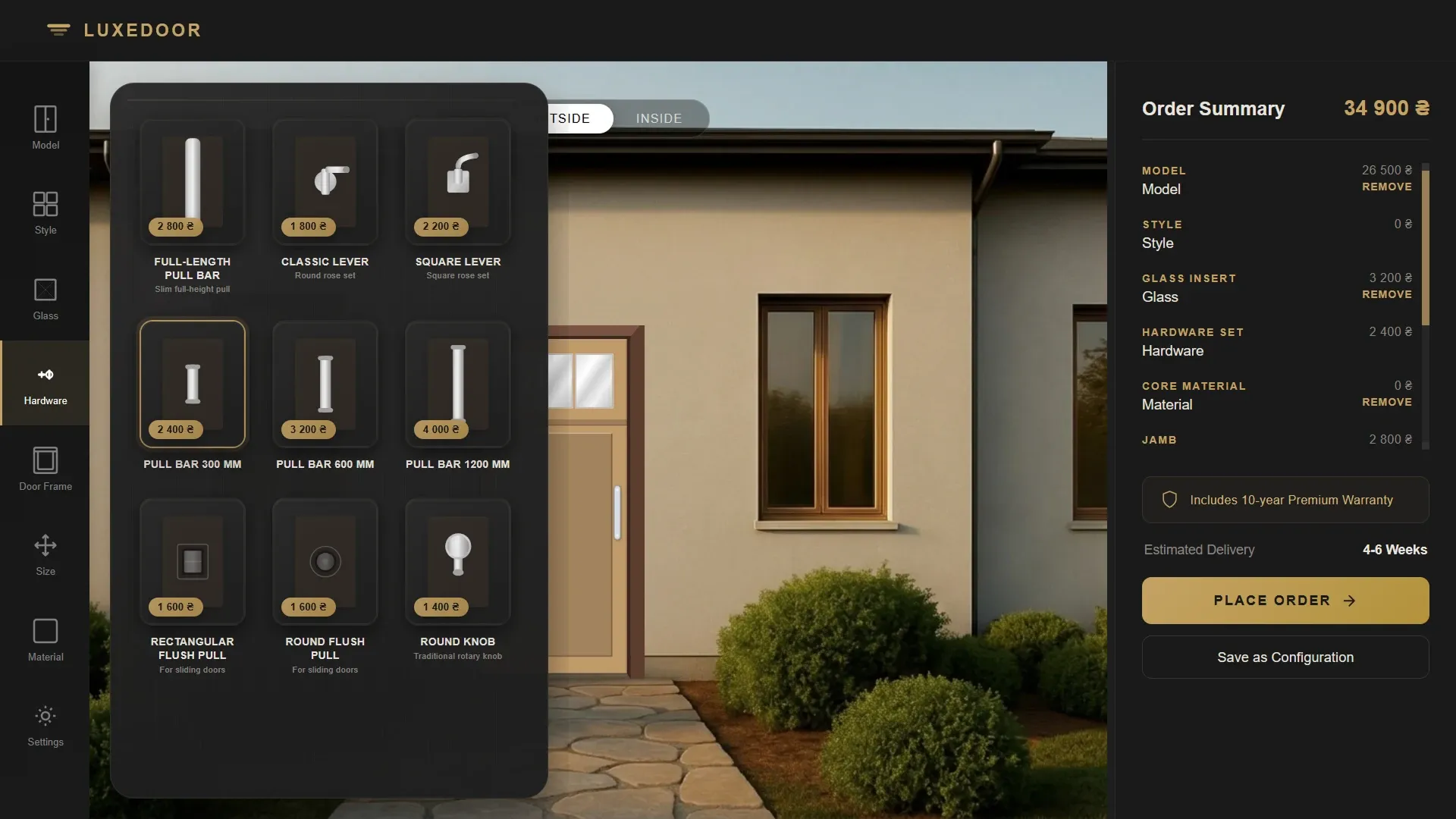
We develop 2D door configurators that allow you to visualize various door combinations directly on your website. This configurator can function as a fully-fledged online sales tool, as a demonstration system for in-store managers, or as an internal tool for quickly calculating custom orders.
The user visits the website, selects a door model, and then begins to assemble the desired configuration interactively. All changes are immediately displayed on the visualization, and the cost can be automatically recalculated based on the selected parameters.


What features can be implemented in the door configurator?
Depending on the specifics of your production and product range, the configurator can support a large number of different parameters and options.
Visual adjustment of doors
The configurator can allow you to change:
- materials and coatings;
- door colors;
- glass insert options;
- types of glass;
- boxes and frames;
- handles and fittings;
- decorative elements;
- interior and exterior appearance of the door;
- sizes and non-standard parameters;
- opening options;
- door styles and series.
All changes are immediately displayed in the interface, allowing the client to see the final result even before placing an order.


Configurator as a sales tool
This configurator can be used not only by end clients but also by company managers. During a consultation, the manager can quickly assemble the desired door configuration together with the client, show different design options, select materials, and immediately generate a preliminary estimate.
This is especially convenient for manufacturers of custom doors, non-standard designs, designer solutions, and premium products, where it is important to show the client a large number of combinations.
Once setup is complete, the system can:
- add product to cart;
- send an order to CRM;
- send parameters by email;
- generate PDF or invoice;
- submit the request to the manager;
- save configuration for reopening;
- send a link to the finished configuration to the client.

Saving configuration by link
One convenient feature is saving a door configuration via a unique link. Clients or managers can save their chosen option and reopen it later with the configured parameters.
This is convenient in situations where:
- the client wants to discuss the option with the family or designer;
- the manager needs to send the configuration to production;
- need to return to the project later;
- The client wants to receive several options for comparison.
In fact, the configurator becomes not only a visualization tool, but also a communication system between the client, manager, and production.
Integration with CRM and business processes
The configurator can be integrated with a CRM system, ERP, website, or internal order processing system. This allows for automated data transfer between the sales department, production, and managers.
For example:
- applications are automatically sent to CRM;
- the manager receives a ready-made configuration;
- parameters are transferred to production;
- a commercial proposal is being formed;
- the cost is calculated automatically;
- The history of client configurations is saved.
Essentially, such a configurator becomes part of the company's digital ecosystem and helps speed up order processing.


AI visualization of interior doors
Additionally, we can implement AI functions for generating interiors and realistic visualizations.
After configuring the door, the system can automatically create an image of the selected door already placed in the interior. This helps the client better understand how the final result will look in the actual space.
In more advanced versions it is possible to:
- upload a photo of your own property;
- automatically integrate the selected door into the interior;
- generate several room options;
- change interior styles via AI;
- create marketing renders for advertising and presentations.
These features work particularly well for premium doors, designer solutions and custom production.


Who is this configurator suitable for?
The development of a configurator is especially relevant for:
- manufacturers of interior doors;
- manufacturers of entrance doors;
- door salons;
- companies with individual production;
- designer door manufacturers;
- factories with a large number of combinations of materials and fittings;
- dealer networks and showrooms.
Custom development for your business
We develop configurators tailored to specific business needs and product specifications. Depending on the project's objectives, this may include:
- simple visual configurator;
- cost calculation system;
- configurator with CRM integration;
- a tool for managers in salons;
- B2B system for dealers;
- AI system for visualizing doors in interiors.
We can also implement an administrative panel that allows your team to independently upload new door models, glass, materials, handles, and images, and manage the catalog without developer intervention.
This approach allows for the gradual expansion of the system's functionality and its adaptation to business development.
Useful materials
- Development of an online designer for windows, doors, and partitions
- Monolith Architectural door configurator
- LUXEDOOR door configurator
- Development of a designer for curtains, blinds, and roller shutters
- Development of a roof configurator
- Development of a configurator for gates and fences
- Development of a configurator for construction and architecture
- 3D configurators + AI + CPQ increase conversion rates for custom product sales.
- Configurator vs. Builder: what's the difference?
- CRM for the furniture business: a working combination of AvadaCRM + configurator + AI assistant


